set 限制解除

油猴脚本:Whois信息卡片 2.0

V 阿呆 (UID: 1) 站长 14小时前 [复制链接]

465 15

更新:已适配进论坛系统,无需手动添加脚本

临时下线功能,切换使用 who.cx?,正在适配中

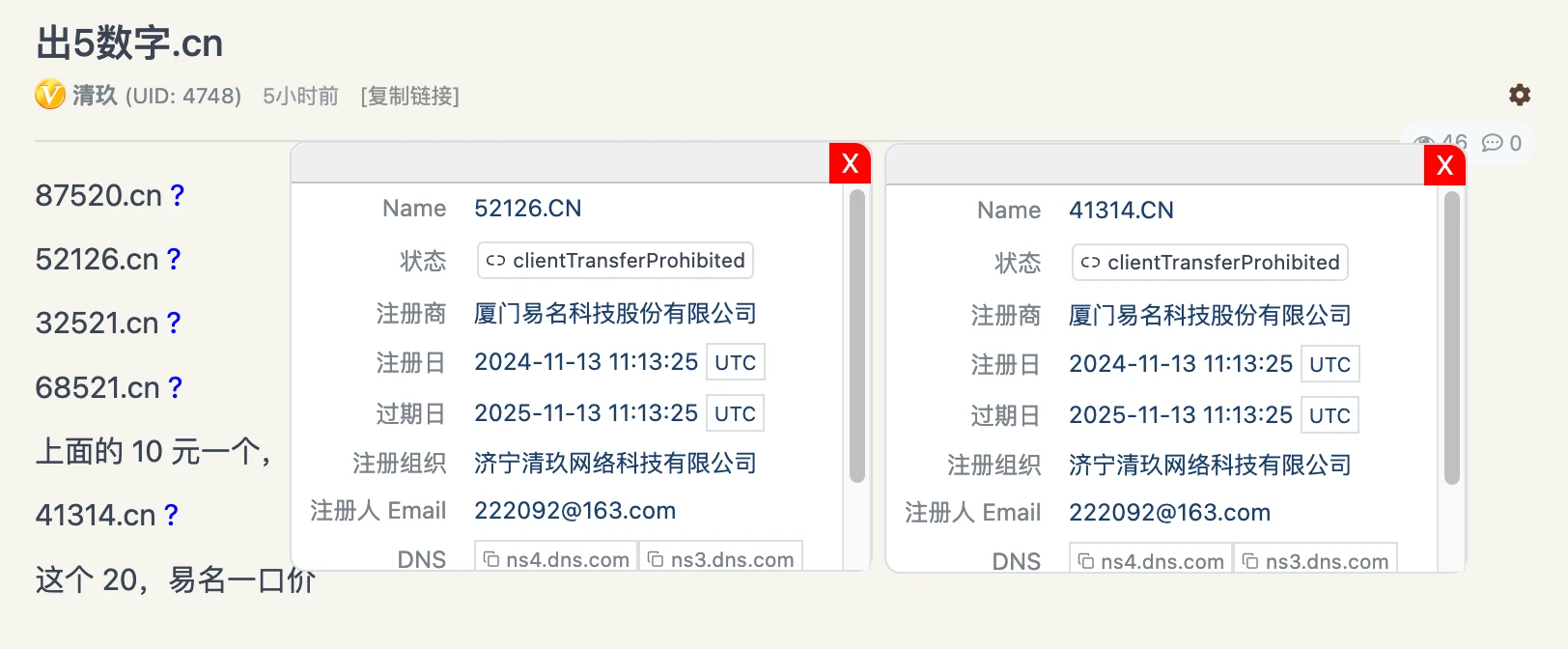
对论坛上帖子、评论提到的域名添加 “?”,并且在点击时弹出 whois 卡片信息。

该脚本使用了 https://who.0du.ru/? 的 whois 功能,本来想用 who.cx? 的,但是有跨域限制。

一些细节没有优化,比如:中文及 IDN 域名未添加识别;

卡片的加载显示时间取决于 who.0du.ru? 的响应速度和存活情况。


修复:(该修复内容没有全部同步到下方脚本)

修复原域名含超链接时将卡片也加入超链接导致冲突问题;

修复将.php、.png 等文件识别成域名后缀问题;

修复将代码块中域名添加 “问号” 的问题;

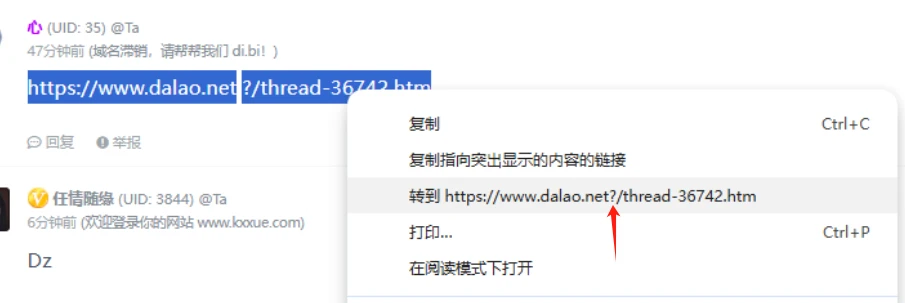
修复 “?” 被错误的插入到路径中的问题;

修复域名存在超链接时问号无法点击的问题;

若干细节优化。

脚本内容:

// ==UserScript==
// @name     dalao.net 查询whois卡片
// @version  2.0
// @grant    none
// @description  在 dalao.net 上对域名点击时显示 whois 查询卡片
// @author       大佬论坛
// @match       *://dalao.net/*
// @match       *://www.dalao.net/*
// ==/UserScript==

(function() {
    // 创建关闭按钮
    function createCloseButton(card) {
        const closeButton = document.createElement('button');
        closeButton.innerText = 'X';
        closeButton.style.position = 'absolute';
        closeButton.style.top = '0px';
        closeButton.style.right = '0px';
        closeButton.style.borderTopRightRadius = '0.6rem';
        closeButton.style.backgroundColor = 'red';
        closeButton.style.color = 'white';
        closeButton.style.border = 'none';
        closeButton.style.cursor = 'pointer';
        closeButton.style.padding = '0px 6px';
        closeButton.addEventListener('click', (event) => {
            card.style.display = 'none';
            event.stopPropagation(); // 阻止事件冒泡,防止关闭卡片时误触发点击外部事件
        });
        return closeButton;
    }

    function loadExternalCSS() {
        const style = document.createElement('style');
        style.innerHTML = `
        .text-sm { font-size: .875rem; line-height: 1.25rem; }
        .whitespace-pre-wrap { white-space: pre-wrap; }
        .w-full { width: 100%; }
        .text-secondary { color: #6b6b74; }
        .text-xs { font-size: .75rem; line-height: 1rem; }
        .py-0\\.5 { padding-top: .125rem; padding-bottom: .125rem; }
        .px-1 { padding-left: .25rem; padding-right: .25rem; }
        .border { border-width: 1px; }
        .rounded { border-radius: .25rem; }
        .whitespace-nowrap { white-space: nowrap; }
        .items-center { align-items: center; }
        .flex-nowrap { flex-wrap: nowrap; }
        .flex-row { flex-direction: row; }
        .cursor-pointer { cursor: pointer; }
        .inline-flex { display: inline-flex; }
        .m-0\\.5 { margin: .125rem; }
        .w-2\\.5 { width: .625rem; }
        .h-2\\.5 { height: .625rem; }
        .mr-1 { margin-right: .25rem; }
        .shrink-0 { flex-shrink: 0; }
        .w-3 { width: .75rem; }
        .h-3 { height: .75rem; }
        .w-3\\.5 { width: .875rem; }
        .h-3\\.5 { height: .875rem; }
        .inline { display: inline; }
        .ml-1\\.5 { margin-left: .375rem; }

        `;
        document.head.appendChild(style);
    }

    // 创建显示 WHOIS 信息的卡片
    function createHoverCard(domain) {
        const card = document.createElement('div');
        card.className = 'rounded-lg border bg-card text-card-foreground shadow';
        card.style.position = 'absolute';
        card.style.zIndex = '29'; // 确保卡片显示在最上层
        card.style.backgroundColor = 'white';
        card.style.border = '1px solid black';
        card.style.padding = '0 0 10px 0;';
        card.style.display = 'none';
        card.style.borderRadius = '0.6rem';

        // 添加可拖动栏
        const dragBar = document.createElement('div');
        dragBar.style.backgroundColor = '#f0f0f0';
        dragBar.style.borderTopLeftRadius = '0.6rem';
        dragBar.style.borderTopRightRadius = '0.6rem';
        dragBar.style.padding = '10px';
        dragBar.style.cursor = 'move';
        dragBar.style.borderBottom = '1px solid #ccc';
        card.appendChild(dragBar);

        const closeButton = createCloseButton(card);
        dragBar.appendChild(closeButton);

        const contentDiv = document.createElement('div');
        contentDiv.style.width = '300px';
        contentDiv.style.height = '200px';
        contentDiv.style.overflowY = 'auto';
        card.appendChild(contentDiv);

        // 实现拖动功能
        let offsetX, offsetY;
        dragBar.addEventListener('mousedown', (e) => {
            offsetX = e.clientX - card.offsetLeft;
            offsetY = e.clientY - card.offsetTop;
            document.addEventListener('mousemove', mouseMoveHandler);
            document.addEventListener('mouseup', mouseUpHandler);
        });

        function mouseMoveHandler(e) {
            card.style.left = (e.clientX - offsetX) + 'px';
            card.style.top = (e.clientY - offsetY) + 'px';
        }

        function mouseUpHandler() {
            document.removeEventListener('mousemove', mouseMoveHandler);
            document.removeEventListener('mouseup', mouseUpHandler);
        }

        // 加载 WHOIS 信息并插入卡片
        const loadWhois = async () => {
            if (contentDiv.innerHTML === '') {
                try {
                    // 加载外部 CSS
                    loadExternalCSS();

                    const response = await fetch(`https://who.0du.ru/${domain}`);
                    const text = await response.text();
                    const parser = new DOMParser();
                    const doc = parser.parseFromString(text, 'text/html');

                    // 提取 whois 信息,并将其放入指定的表格容器内
                    const whoisTable = doc.querySelector('table.w-full.text-sm.mb-4.whitespace-pre-wrap');
                    if (whoisTable) {
                        contentDiv.innerHTML = ''; // 清空当前内容
                        contentDiv.appendChild(whoisTable);  // 插入 WHOIS 信息的表格
                    } else {
                        contentDiv.innerHTML = '无法获取 WHOIS 信息';
                    }
                } catch (error) {
                    contentDiv.innerHTML = '请求失败';
                }
            }
        };

        // 点击卡片外部关闭卡片
        const closeOnClickOutside = (event) => {
            if (!card.contains(event.target)) {
                card.style.display = 'none';
                document.removeEventListener('click', closeOnClickOutside);
            }
        };

        document.addEventListener('click', closeOnClickOutside);

        return { card, loadWhois };
    }

    // 查找文本节点并处理
    function findTextNodesInContainers(containers) {
    const textNodes = [];
    containers.forEach(container => {
        // 如果容器本身是 <pre>,直接跳过
        if (container.matches('pre') || container.closest('pre')) {
            return;
        }

        const walker = document.createTreeWalker(container, NodeFilter.SHOW_TEXT, null, false);
        let node;
        while (node = walker.nextNode()) {
            // 如果文本节点的父节点是 <pre>,跳过
            if (!node.parentNode.closest('pre')) {
                textNodes.push(node);
            }
        }
    });
    return textNodes;
}

    // 验证域名是否有效
    function isValidDomain(domain, validTLDs) {
        const domainParts = domain.split('.');
        const tld = domainParts[domainParts.length - 1];
        return validTLDs.has(tld.toLowerCase());
    }

    // 添加问号图标并绑定点击事件
    async function addQuestionMarkToDomains(textNode, validTLDs) {
    const text = textNode.nodeValue;
    const domainRegex = /\b(?:[a-z0-9-]+\.)+[a-z0-9]{2,6}(?!\.[a-z0-9]{2,6})\b/gi;
    const matches = [...text.matchAll(domainRegex)];

    if (matches.length) {
        const span = document.createElement('span');
        const parts = [];
        let lastIndex = 0;

        matches.forEach(match => {
            parts.push(text.slice(lastIndex, match.index)); // 插入前半部分
            const domain = match[0];

            // 验证域名是否有效
            if (isValidDomain(domain, validTLDs)) {
                const parentAnchor = textNode.parentNode.closest('a');

                if (parentAnchor) {
                    // 如果域名在超链接中,不替换内容,而是在超链接外部插入问号
                    const questionMark = document.createElement('span');
                    questionMark.textContent = '?';
                    questionMark.style.marginLeft = '4px';
                    questionMark.style.cursor = 'pointer';
                    questionMark.style.color = 'blue';
                    questionMark.addEventListener('click', (event) => {
                        event.stopPropagation();

                        // 创建并显示 WHOIS 卡片
                        const { card, loadWhois } = createHoverCard(domain);
                        document.body.appendChild(card);
                        card.style.display = 'block';
                        card.style.left = `${event.pageX + 10}px`;
                        card.style.top = `${event.pageY + 10}px`;
                        loadWhois();
                    });

                    // 如果问号不存在,则插入到超链接后方
                    if (!parentAnchor.nextSibling || parentAnchor.nextSibling.textContent !== '?') {
                        parentAnchor.insertAdjacentElement('afterend', questionMark);
                    }
                } else {
                    // 如果域名不在超链接中,按原逻辑处理
                    const spanDomain = document.createElement('span');
                    spanDomain.textContent = domain;

                    const questionMark = document.createElement('span');
                    questionMark.textContent = '?';
                    questionMark.style.marginLeft = '4px';
                    questionMark.style.cursor = 'pointer';
                    questionMark.style.color = 'blue';
                    questionMark.addEventListener('click', (event) => {
                        event.stopPropagation();

                        // 创建并显示 WHOIS 卡片
                        const { card, loadWhois } = createHoverCard(domain);
                        document.body.appendChild(card);
                        card.style.display = 'block';
                        card.style.left = `${event.pageX + 10}px`;
                        card.style.top = `${event.pageY + 10}px`;
                        loadWhois();
                    });

                    const containerSpan = document.createElement('span');
                    containerSpan.appendChild(spanDomain);
                    containerSpan.appendChild(questionMark);

                    parts.push(containerSpan);
                }
            } else {
                parts.push(domain); // 如果不是有效域名,保持原样
            }
            lastIndex = match.index + domain.length;
        });

        parts.push(text.slice(lastIndex));
        span.append(...parts);

        // 替换原始文本节点
        if (!textNode.parentNode.closest('a')) {
            textNode.replaceWith(span);
        }
    }
}

    // 获取所有包含文本的容器
    const containers = Array.from(document.querySelectorAll('.message.break-all.box-shadow, .message.mt-1.break-all'));

    // 下载域名后缀名单
    async function fetchValidTLDs() {
        try {
            const response = await fetch('https://www.dalao.net/lunbo/domain.txt');
            const text = await response.text();
            const validTLDs = new Set(text.trim().split('\n').map(tld => tld.toLowerCase()));
            return validTLDs;
        } catch (error) {
            console.error('Failed to fetch valid TLDs:', error);
            return new Set(); // 返回空集以防后续错误
        }
    }

    // 初始化并处理文本节点
    fetchValidTLDs().then(validTLDs => {
        const textNodes = findTextNodesInContainers(containers);
        textNodes.forEach(textNode => {
            addQuestionMarkToDomains(textNode, validTLDs);
        });
    });
})();
JavaScript
啊?????
已有评论 ( 15 )
创建新帖
IP检测信息